Omassh
A keyboard-driven SSH client for the terminal — Termius’s data model, lazygit’s interaction model, running on top of real OpenSSH.
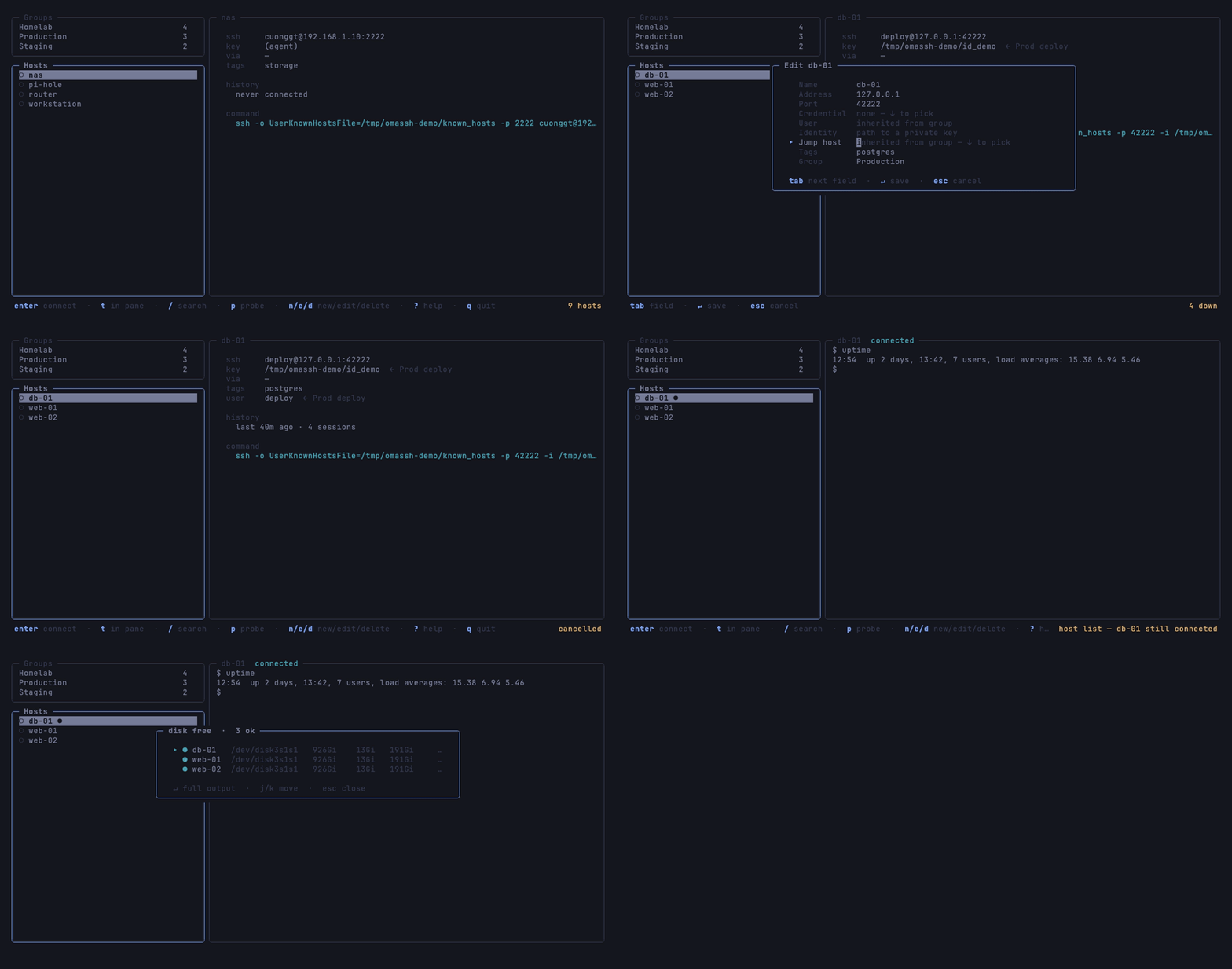
Keep your hosts in groups that share a user, a key and a jump host. Connect
with a keystroke, full screen or in a pane beside the list. Browse files, keep
tunnels up after you quit, and run a script across a whole group — all through
the ssh already on your machine.
Why Omassh
It runs the real OpenSSH. Every connection is your own ssh, so
~/.ssh/config, ProxyJump, certificates, Match blocks and the agent all
apply exactly as they do on the command line. There is no second SSH
implementation to disagree with the first.
It keeps no secrets. A host names a key by its path, a passphrase is ssh-agent’s job, and a password lives in the operating system’s keychain. The host list exports to a YAML file that belongs in a dotfiles repository.
What you start keeps running. With tmux installed, sessions in the pane and tunnels run on a tmux server of Omassh’s own, so quitting detaches rather than disconnects. Open Omassh again and the shell is where you left it, and the database tunnel is still up.
Install
brew install --cask cuonggt/tap/omassh
Or with Go:
go install github.com/cuonggt/omassh/cmd/omassh@latest
Archives for macOS and Linux, on amd64 and arm64, are on the releases page.
Omassh needs:
- OpenSSH.
sshmakes every connection; password credentials need 8.4 or newer. - tmux, optionally. Without it, a session in the pane ends when Omassh does, and port forwarding is unavailable.
- A keychain, for password credentials only — built in on macOS, and
secret-toolfrom libsecret on Linux.
Quick start
If you already keep hosts in ~/.ssh/config, start from those:
omassh import-ssh-config
omassh
j/k move, enter connects, ? lists every key and q quits. n adds a
host by hand.
Concepts
Hosts are a name and an address, with an optional port, user, key, jump host, credential, group and tags.
Groups nest, and a host fills anything it leaves empty — the user, the key,
the jump host — from the nearest group above it that sets it. The detail pane
marks an inherited value with where it came from, ← Production, and
selecting a group shows every host beneath it.
Credentials are a user and a way of proving it — a key, the agent, or a password kept in the keychain — named once and shared by the hosts and groups that use it.
Jump hosts are picked from your own hosts and reached with their own port, user and key, and chains of them work. Any other ssh destination works too.
More in hosts, groups and jump hosts and credentials.
What it does
Sessions. enter hands the whole terminal to ssh and
brings you back when it exits. t opens the session in the main pane beside
the list instead. While the pane has focus every key goes to the remote, so
Omassh’s own commands sit behind ctrl+\: ctrl+\ w back to the list,
ctrl+\ d to detach. A drag across it copies what it covers.
Files. s opens a two-pane browser, your machine beside
the host. Copies land atomically, a directory goes over as a whole tree, and
overwriting anything asks first.
Tunnels. f keeps a host’s local, remote and
dynamic forwards. They run in tmux and outlive the window, say why when they
fail, and show ▷ when their rule has changed underneath them.
Snippets. S keeps the scripts worth keeping, and runs
one across a host, a group or any set you pick, four hosts at a time,
collecting what each one said. p pastes it into the session instead.
Reachability. p checks which hosts in the
group answer on their ssh port, skipping those behind a jump host, whose
address means nothing from here.
Moving between machines. The list exports to YAML and
imports by name, so it merges rather than overwrites. It can also be written
into ~/.ssh/config, for scp, rsync and git to reach the same hosts.
Keys
| key | |
|---|---|
j / k, ↓ / ↑ |
move |
tab, 1 / 2 |
switch panel: groups, hosts |
/ |
fuzzy search every host by name, address or tag; esc clears it |
enter |
connect — ssh takes the whole terminal, and exiting returns here |
t |
connect in the main pane instead, keeping the host list |
n / e / d |
new / edit / delete a host, or a group in the group list |
p |
probe reachability of the hosts in this group |
s |
SFTP: browse and transfer files |
f |
port forwarding |
C |
credentials |
S |
snippets |
T |
pick a theme, previewing as you move |
r |
reload the store from disk |
ctrl+l |
redraw the screen |
? |
help, which names the running version |
q |
quit |
In a session in the main pane, behind the ctrl+\ prefix:
| key | |
|---|---|
ctrl+\ w |
back to the host list; the session keeps running |
ctrl+\ n / ctrl+\ p |
the next / previous host with a session running |
ctrl+\ d / ctrl+\ X |
detach / end the session |
ctrl+\ k / ctrl+\ j |
scroll back / forward a page |
ctrl+\ G |
back to the live view |
ctrl+\ r |
redraw the screen |
In a form, tab moves between fields, ↓ offers what you already use — jump
hosts, groups, tags — and ↵ saves. The lists behind C, S and f take
n, e and d the same way. A click selects, the wheel scrolls whichever
list or session is under the pointer, a drag across a session copies what it
covers, and paste works everywhere, a session included. Every key in the first
table can be rebound.
Command line
| command | |
|---|---|
omassh |
browse and connect |
omassh export [-o FILE] |
write the host list as YAML |
omassh import [-n] [FILE] |
merge a YAML host list, from stdin if no file |
omassh import-ssh-config [-n] [-group NAME] [FILE] |
take the hosts ~/.ssh/config names |
omassh export-ssh-config [-n] [-o FILE] |
write the hosts into ~/.ssh/config |
-n reports what would change and writes nothing. omassh itself takes
-o OPTION, passed to every ssh as ssh -o would pass it; -db and
-config, to use another database or config file; -print-config, for a
documented example config; and -version.
Configuration
Nothing needs configuring. The config file is
~/Library/Application Support/omassh/config.yaml on macOS and
~/.config/omassh/config.yaml on Linux, and holds the theme and your own
palettes, key bindings, ssh options and the probe timeout. A mistake in it is
an error at startup that names the line, never a setting silently ignored.
omassh -print-config writes a documented example, its first line naming the
path it belongs at. More in configuration.
Troubleshooting
The screen went blank. Some terminals clear the screen without telling the
program running in them — iTerm2’s cmd+K is the common one — and Omassh
still believes its last frame is there. ctrl+l repaints; inside a session,
where ctrl+l belongs to the remote shell, use ctrl+\ r.
Copying from a session puts nothing on the clipboard. If the status bar
says it asked the terminal to copy, there was no clipboard program to hand it
to — Omassh is running over ssh, or Linux has no wl-copy, xclip or
xsel — and the terminal turned the request down. iTerm2 needs “Applications
in terminal may access clipboard”; a tmux of your own needs set-clipboard on.
Text outside a session will not select. Omassh takes the mouse so that the
wheel scrolls and a drag in a session copies. Hold your terminal’s modifier —
shift in most — to select anywhere else as usual.
A tunnel, the file browser or a snippet run cannot log in. Nobody is there
to answer a prompt, so those connections never ask. ssh-add a key that has a
passphrase, and connect once with enter to accept a host key ssh has not
seen before. A password credential answers from the keychain; if the host
refuses it, C to type the password again.
Something is still running. Sessions and tunnels live on Omassh’s own tmux
server, apart from your own: tmux -L omassh ls lists them.
Development
go run ./cmd/omassh -db /tmp/x.db -config /tmp/x.yaml   # a scratch host list
go test ./...
The tests need tmux for full coverage, and skip what needs it where it is
missing; nothing needs Docker or a real host. Releases are built with
GoReleaser, and
goreleaser release --snapshot --clean makes the archives, checksums and
cask locally without publishing. ./hack/demo.sh re-records the demo with
VHS, against a throwaway SSH server on
loopback.
License
MIT © Cuong Giang